
Oman eVisa website not working? First, check if the portal is down globally by testing on a second device. If it loads, clear your browser cache and cookies, switch to Chrome 120+ or Firefox 120+, and disable any VPN. For persistent errors, contact support at 80080011 or email [email protected].
This guide helps fix Oman eVisa website errors: browser cache conflicts, server-side issues, and VPN-triggered IP blocks on evisa.rop.gov.om. Last reviewed: September 2026. Portal configurations change frequently; always verify the latest browser requirements at evisa.rop.gov.om before applying. This is an independent troubleshooting guide, not affiliated with the Royal Oman Police. All contact details are sourced from the Government of Oman’s eVisa portal as of 2026.
Oman eVisa Website Not Working? How to Check in 30 Seconds
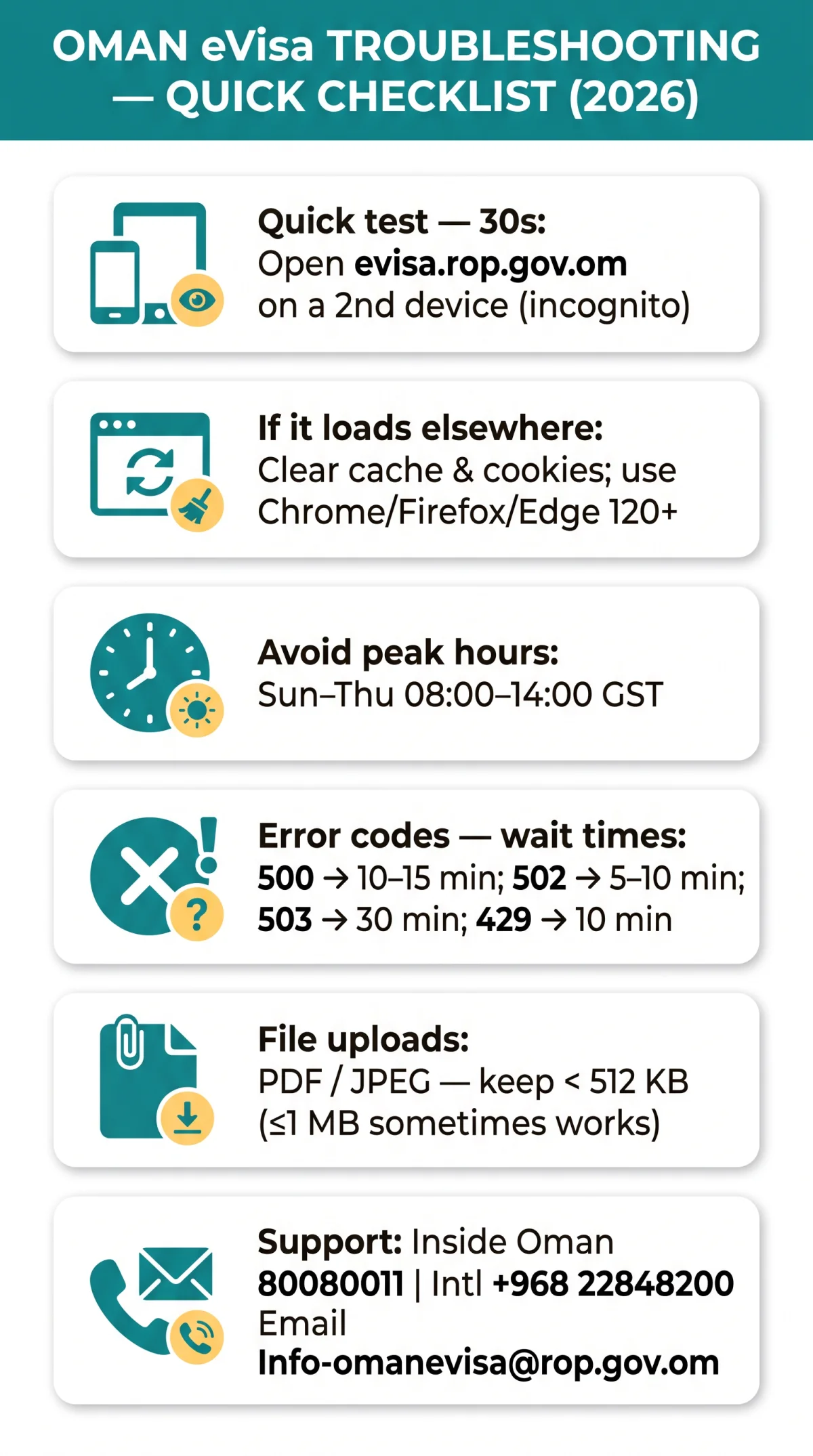
Test evisa.rop.gov.om on a second device in incognito mode. If it loads there, the problem is your browser cache, not the server. The Oman eVisa website experiences higher error rates during peak hours (Sunday-Thursday, 08:00-14:00 GST); applying outside these windows reduces failure likelihood. Use the Find Visa Application link after login as an alternate visa application status check.
| Error Code | Meaning | Action |
|---|---|---|
| 500 | Internal Server Error | Wait 10-15 min, retry |
| 502 | Bad Gateway | Wait 5-10 min, retry |
| 503 | Service Unavailable | Check maintenance, wait 30 min |
| 504 | Gateway Timeout | Check connection, retry |
| 429 | Too Many Requests | Stop refreshing, wait 10 min |
Is It Just You or Is the Whole Portal Down?
Test the Oman eVisa website on a second device or use a third-party status checker such as DownDetector. If the issue is global, the Oman eVisa portal is likely experiencing downtime or maintenance. If it works on another device, check your browser, cache, and internet connection.
Where to Find Scheduled Maintenance Announcements
The Oman eVisa website does not publish a fixed maintenance calendar. The ROP Twitter/X account @RoyalOmanPolice posts outage notices, and portal banner messages on evisa.rop.gov.om display active maintenance alerts when the Oman eVisa portal is temporarily unavailable.
Browser Compatibility: Which Browsers Work with the Oman eVisa Portal?
Chrome 120+, Firefox 120+, and Edge work reliably with the Oman eVisa portal. Internet Explorer and outdated mobile browsers cause rendering failures and broken form fields on the Oman eVisa website. Ensure JavaScript is enabled, pop-up blockers are disabled, and cookies are allowed.
| Browser | Version | Status (tested 2026) |
|---|---|---|
| Google Chrome | 120+ | ✅ Works |
| Mozilla Firefox | 120+ | ✅ Works |
| Microsoft Edge | Latest | ✅ Works |
| Safari (macOS) | Latest | ⚠️ Partial |
| Safari (iOS) | Latest | ⚠️ File upload may fail |
| Internet Explorer | Any | ❌ Not supported |
Mobile and Tablet Compatibility Limitations
The Oman eVisa website works on iPhone 15, Samsung Galaxy S24, and iPad, but Safari on iOS may fail during file uploads. If you encounter upload errors on mobile, switch to a desktop browser or use Chrome on Android. See the file upload constraints in the 500 errors section below.
Fix Oman eVisa Website Not Working: Clear Your Cache and Cookies
Clearing browser cache and cookies for evisa.rop.gov.om resolves the majority of login loops, form errors, and stuck sessions on the Oman eVisa portal. Alternatively, open an incognito or private window as a quick test.
Chrome
Settings → Privacy and security → Clear browsing data → select “Cookies and cached images” → Clear data.
Firefox
Settings → Privacy and Security → Clear Data → check both boxes → Clear.
Safari
Safari menu → Clear History → choose “all history” → Clear History.
Edge
Settings → Privacy, search and services → Clear browsing data → select cached files and cookies → Clear now.
Why You Keep Getting Logged Out: Session Timeout Explained
The Oman eVisa website times out after prolonged inactivity. The exact threshold is undocumented. Keep your tab active and work in focused sessions to avoid losing progress on the Oman eVisa portal.
Can You Recover an Incomplete Application?
Draft recovery is not guaranteed on the Oman eVisa website. Save progress frequently and note any reference numbers displayed on screen, as the Oman eVisa portal may not retain incomplete applications after a session timeout.
Login Issues on the Oman eVisa Website: How to Fix Them
The Oman eVisa portal requires PRO or Sponsor login type selection. Choosing the wrong type or entering wrong credentials triggers errors. You must register via the ‘Register as user’ icon before applying. PRO login requires accreditation in the eVisa system as a PRO. Sponsor registration is available to residents of the Sultanate of Oman only with a valid Civil Number. Organisation registration requires a valid Company Register Number.
Common login failures on the Oman eVisa website include:
- Incorrect credentials
- CAPTCHA validation errors
- Wrong login type selected
Use the password reset link on the login page to recover access. The Oman eVisa portal also hosts a Frequently Asked Questions page as a first resource.
Account Lockout After Failed Login Attempts
Multiple failed login attempts on the Oman eVisa website may trigger an account lockout. The exact threshold is not publicly documented. If locked out, contact support at 80080011 or +968 22848200.
Check the Portal’s Own FAQ Before You Do Anything Else
The Oman eVisa website includes a Frequently Asked Questions page accessible from the main navigation. Check it as a first resource before contacting support about the Oman eVisa portal.
500 Internal Server Error and Other Common Errors on the Oman eVisa Portal
A 500 Internal Server Error on the Oman eVisa portal is server-side and temporary. Wait 10-15 minutes and retry. Codes 502, 503, 504, and 429 require the same approach: stop refreshing and wait. If the form will not submit, oversized file uploads are a likely cause on the Oman eVisa website.
File Upload Errors: Accepted Formats and Size Limits
The Oman eVisa website accepts PDF and JPEG files. According to the ROP help page, the maximum file size is approximately 512 KB, but user tests show up to 1 MB sometimes works. To be safe, stay below 512 KB. Use a compression tool to reduce file size before uploading to the Oman eVisa portal.
What to Do When the Payment Page Crashes on the Oman eVisa Portal
If the Oman eVisa website crashes during payment, do NOT close the tab. Wait 15 minutes, then check your bank app for duplicate charges before retrying on the Oman eVisa portal.
0 min
Do NOT close the tab or click back.
5 min
Check your bank app for pending charges.
15 min
If no charge visible, retry payment.
30 min
If charged but no confirmation, call support at +968 22848200 within 24 hours with your bank transaction ID.
VPN, Proxy, and Connection Issues for UK Users
Commercial VPNs frequently trigger 403 Forbidden errors on the Oman eVisa portal. UK users should switch to a direct ISP connection before applying. If the Oman eVisa website fails on UK mobile data (some networks filter .gov.om domains), switch to WiFi or another network.
How to Test If Your VPN Is Blocking the Oman eVisa Portal
Disable your VPN, load evisa.rop.gov.om, then re-enable and compare. The Oman eVisa website may block OpenVPN UDP connections; switching to TCP or WireGuard can resolve the issue.
UK ISP-Level Restrictions and Mobile Data Workarounds
Some UK mobile networks apply content filtering that can block .gov.om domains. If the Oman eVisa website fails on mobile data, switch to WiFi or an alternative mobile network and retry accessing the Oman eVisa portal.
Contact the Oman eVisa Support Team
Oman eVisa support is available 24×7 via toll-free 80080011 inside Oman, +968 22848200 internationally, or email at [email protected]. Prepare your reference ID and error screenshot before calling about the Oman eVisa website.
| Channel | Details | Availability |
|---|---|---|
| Phone (Inside Oman) | 80080011 (toll-free) | 24×7 |
| Phone (Outside Oman) | +968 22848200 | 24×7 |
| [email protected] | 24×7 |
Other Royal Oman Police e-services, including Online Exit Penalty Payment and Visa Application Status, are accessible via evisa.rop.gov.om.
What Information to Prepare Before Contacting Support
- Temporary reference ID or application number
- Browser name and version
- Screenshot of the error message
- Date and time of the failed attempt
- Payment receipt or bank transaction ID (if payment-related)
Frequently Asked Questions (FAQ)
The most common reasons the Oman eVisa website stops working are browser cache conflicts, server overload during peak hours, and VPN-triggered IP blocks. Below are quick answers to the most frequently asked questions.
Why is the Oman eVisa website not working right now?
The portal may be down for scheduled maintenance, experiencing a server error like 500 or 503, or your browser cache is causing the issue. Check the portal status first, then try clearing your cache or switching browsers.
How do I fix the Oman eVisa login error?
Ensure you are using the correct login type, which is either PRO or Sponsor. Reset your password if needed and clear your browser cache. If your account is locked after multiple failed attempts, contact support at 80080011.
What does 500 Internal Server Error mean on the Oman eVisa portal?
A 500 error means the server is temporarily overloaded. Wait 10 to 15 minutes and retry; refreshing can trigger a 429 error.
Which browsers work best with the Oman eVisa website?
Google Chrome 120+, Mozilla Firefox 120+, and Microsoft Edge work reliably with the Oman eVisa portal. Safari may work with limitations on mobile devices, particularly with file uploads. Avoid Internet Explorer and outdated browser versions.
What should I do if the Oman eVisa payment page crashes?
Do NOT close the tab. Wait 15 minutes, then check your bank app for pending or duplicate charges. If charged twice, call +968 22848200 within 24 hours with your bank transaction ID.
Can I use a VPN to access the Oman eVisa website from the UK?
Commercial VPNs frequently trigger 403 Forbidden errors on the Oman eVisa portal. UK users should switch to a direct ISP connection before applying.
How do I check my Oman eVisa application status if the portal is down?
Use the Find Visa Application link after logging in, or call 80080011.
Is the Oman eVisa website down for everyone or just me?
Test the Oman eVisa portal on a second device or use a third-party status checker. If the issue is global, the portal is likely experiencing downtime or maintenance. If it works on another device, check your browser, cache, and internet connection.
Can I apply for an Oman eVisa without registering an account?
No. The Oman eVisa portal requires you to register as a user via the Register as user icon before you can initiate any visa application.
What are the Oman eVisa portal’s peak hours when it is slowest?
Peak hours are not officially published, but user reports suggest higher load during Oman business hours, which are Sunday to Thursday, 08:00 to 14:00 GST (04:00 to 10:00 GMT). Applying outside these windows may reduce errors.